
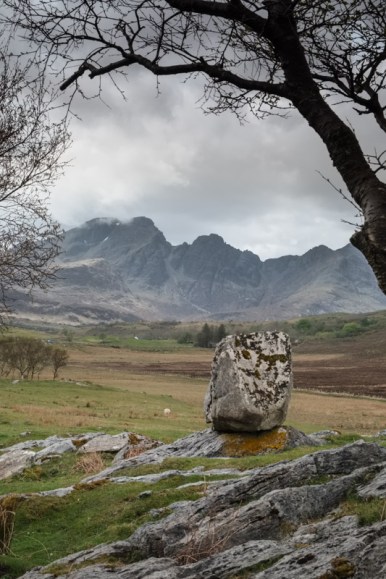
Taken from a similar spot to Joe Cornish’s iconic photo.
Last week’s holiday on the Isle of Skye was a delight, and one of the standouts for me was the ‘photo day’ I had with Russell Sherwood (see link below). Russell is a local professional photographer, has a fine art photo gallery and runs individual and group workshops and courses. I wanted someone to show me the best sights on Skye for photos, and felt that I could pick up some tips on how to take better photographs. In particular I reckoned that I wasn’t getting as many truly sharp images as I thought I should.
My very reasonably priced one-to-one day with Russell was certainly full-on – we covered a lot of ground (Skye is a big island!) and walked and carried gear across a lot of rocky paths and beaches, but I got some photos I am delighted with. I definitely picked up some useful pointers, and figured out how to get much better and sharper photos – here are a few of the ‘lessons’ from the day.
#1. Don’t try and cover too much ground. Stay in one place until you have the shot you want, or exhausted the possibilities there – wait and get the best shot possible rather than rush off to the next location.
#2. Stability is everything. Use a tripod big enough for the job – my Manfrotto 190 was struggling in the wind, and wasn’t really tall enough for some shots. A tripod head that is easy to level is a great help – either a good ball & socket head or a geared head. Use a remote release and self timer – this ensures the camera doesn’t move at the point of taking the photo. I’ve been guilty of not using the remote release, thinking I could ‘squeeze’ the shutter without moving the camera.
#3. Get the exposure right in camera. Although its easy to adjust exposure and contrast on the computer back at base, its so much better to get the image right in the camera – it gives you so much more to work with. Key points are – use graduated filters to even out extremes of brightness across the shot if possible, and always check the histogram when taking the shot to ensure highlights in particular are not burnt out (shadows can usually be brightened, but if the highlights have gone, there is not much that can be done.)
#4. Don’t overdo long exposures. The trend nowadays to to use a ‘Big Stopper’ type extreme neutral density filter to give a long exposure to blur water and skies. There’s a real danger this is just a fad, and its certainly overdone! Best to try less extreme exposures as well.
#5. Don’t try and change lenses mid-stream. Literally! Depends on location, but switching lenses while on location can be a nightmare – consider the obvious risk of dropping gear while you are standing on a cliff edge or in a stream, and the possibility of getting dust or spray on the sensor. Either use a zoom lens to adjust field of view if its not feasible to change position, or even just set up two camera bodies as they are generally easier to change over.
So as well as picking up on the technique points above, I have a new heavier duty tripod and head on order, a ‘Little Stopper’ filter for less extreme long exposures, and a new larger camera bag to make it easier to work with all the paraphenalia when out. I’m sorely tempted by the Fuji 10-24mm zoom lens, but this is physically much bigger and heavier than the gear I have now, and will mean swapping out all my lovely neat little Lee Seven5 filters for the very much larger and heavier 100mm versions!
Russell can be found at http://skyescapegallery.zenfolio.com
Here are a few more of my favourites from what was a brilliant day out!
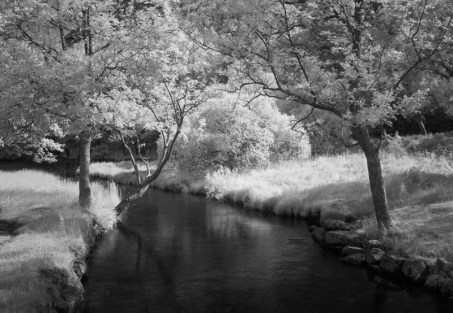 These photos were taken on my trusty Fuji X100S camera – the fixed 23mm lens displays no hot-spots at all. The optical viewfinder is very helpful, as once the infra-red filter is in place (in this case a Hoya R72 filter) so little light comes through to the sensor that the image on the LCD screen is very dark indeed. Exposures are always much longer than usual, so a tripod is essential. These photos were imported into Adobe Lightroom, converted to mono (I’m not a fan of colour infra-red) and the levels and contrast adjusted – its as simple as that!


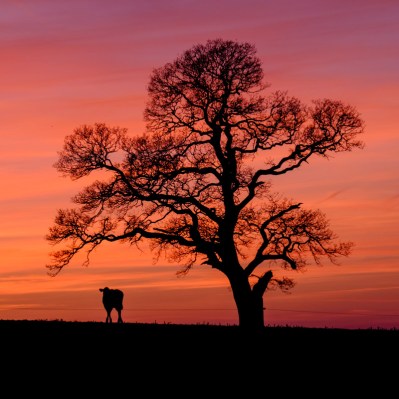 Last night was a perfect reminder – we were sitting at home having a drink when OH noticed the sunset colours developing and the cows at the top of our garden. Encouraged by her (it was hard to tear myself away from a Sauvignon Blanc, even for a photo), I grabbed my Fuji X-T1 and raced to the top of the garden. Managed to get maybe 6 shots off while the cows were suitably juxtaposed with the big old oak tree, and before the colours faded. No time to set up a tripod, all shots were taken with the camera balanced on a fence post.


 Nigel Young